

Choose your slot
1
Pick a service
Each service has its own duration and price. A Meet and greet — a short, free online
conversation — sits at the top when the therapist offers one.
2
Pick how you'll meet
Online, in person, or a home visit, from whichever the therapist offers. Changing this clears your
time.
3
Pick where
For in-person work, which clinic. For a home visit, your suburb — or Somewhere else, in which
case message them before booking.
4
Pick a date and time
On the hour, grouped into Morning, Afternoon and Evening, in your own timezone with the
zone named underneath.
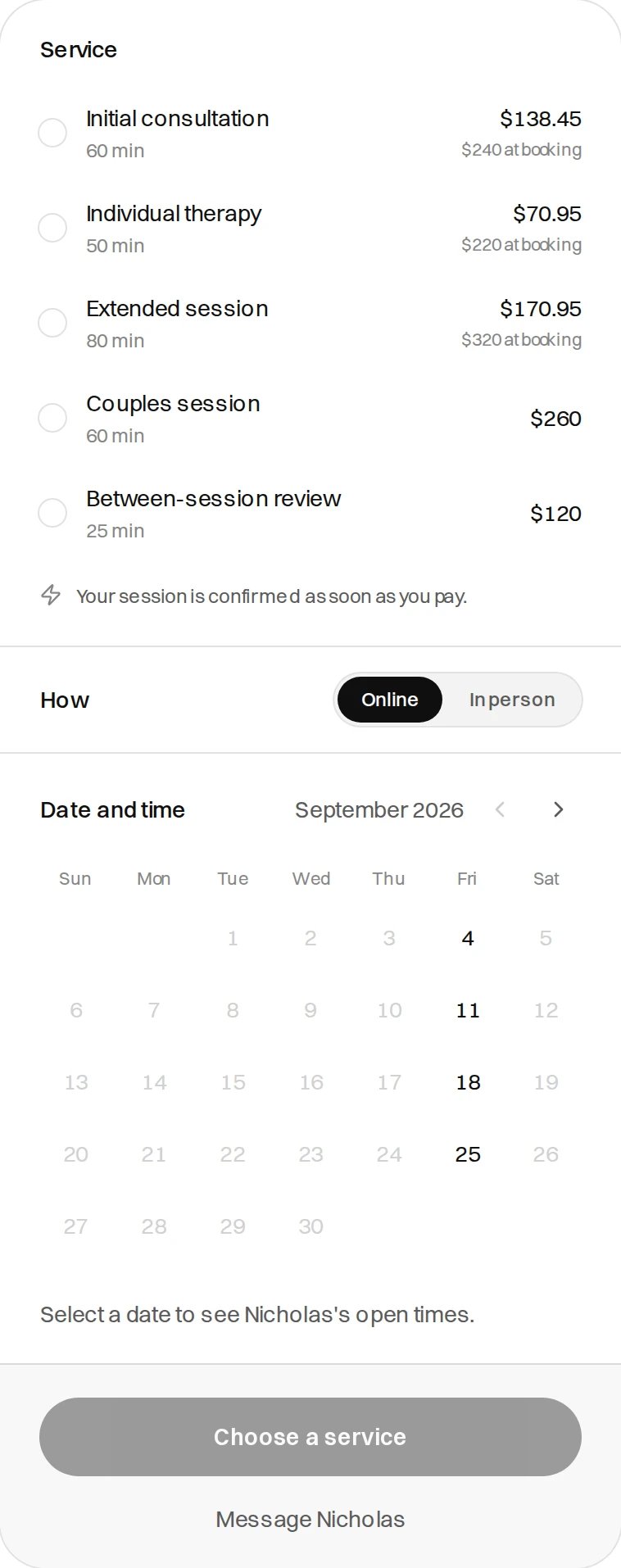
You work down the panel in order, and only days with times left are selectable
Checkout
Step 1 — your details
Optional: your phone number, and What would you like to work on?, which goes to the therapist before the session. A Gift card code field sits here too. A published sliding scale offers the standard fee or reduced bands, each with the household income it’s for. Nothing is checked and no paperwork is asked for.No account yet? Sign up in this page — name, email, six-digit code — with the card form underneath.
See Create an account.
Step 2 — payment
Your card is charged in full now and held until the session happens. Saved cards appear here. The summary lists the therapist, service, duration, when, how, where, the total, a Change service or time link, and the cancellation terms. The total is the session plus card processing — written as $180.00 session + $3.42 card processing. A gift card or reduced fee names the original price.Paying holds the hour for 15 minutes. The page counts down: “This time is held for you
for 14:59. After that it goes back to whoever wants it.” If the clock runs out, the hour is
released and you’ll need another slot.
Booking rules
Both defaults are the therapist’s to change, along with any gap either side. The calendar pages past the booking window, but those days carry no times.
Two people can’t buy the same hour. Lose a slot at checkout and you’re told — “That time was just taken. Choose another slot.” Reloading the payment page returns you to the same payment rather than charging twice.
Confirmation
- Your session is booked
- Confirming your payment
The therapist, service, when, how, where and what you paid, with links to your sessions and to what
happens next. Your confirmation email carries the video link or the address, and the cancellation
terms in writing.
When you can’t book
Booking with a support worker
Support workers are engaged by the hour on a roster. Their page has a request form instead of a checkout — see Therapist profiles.Next
Paying for sessions
When you’re charged, what’s on your statement, and refunds.
Cancellations
Moving a session, the windows, and late fees.