

The library
Ten scored instruments ship with the platform, reproduced as published.
Filter by category or search by name. Each carries its attribution.
Licensed instruments are deliberately absent
The Beck inventories, the Y-BOCS, the ORS and the SRS are not in the library and won’t be: every instrument here is free to use in clinical practice. Reproduce anything you’re licensed for as a custom form under your own licence.Scoring comes from the registry
You never type a score in, and neither does the client. The instrument turns answers into a score, a severity band and, where it defines one, a risk flag. One definition per instrument means a chart across four months compares like with like. Direction is part of the definition: a falling PHQ-9 and a rising WHO-5 are both drawn as improvement.Open Therapy scores an instrument. It does not interpret one, and nothing on the platform tells you
what to do about a score.
Your own forms
New form opens the builder. Questions can be scales, single or multiple choice, short or long text, a number, a date, a yes/no, or a section heading. Five editable starting points sit in the library: Intake questionnaire, Consent to treatment, Telehealth consent, Safety plan and Session feedback. Copying one gives you a draft of your own. Publish a form before you send it.Sending one
1
Choose the form
From the measures library, your own forms, or the client’s file.
2
Choose the client
Only clients with an account can be sent a form — see Client files.
3
Choose how often
Once, weekly, fortnightly, monthly or quarterly. Fortnightly is the default.
4
Set the dates
A start date, and an optional end date. A repeating assignment runs until you end it, to a
ceiling of 260 occurrences.
5
Add a note (optional)
Up to 1,000 characters, shown to the client with the form.
Due dates don’t move with the reader
Almost every date on Open Therapy renders in the reader’s timezone. Form due dates stay on the portal’s timezone for both of you.Reading what comes back
Out with clients lists live assignments. Anything with a flagged response — a self-harm item, or a risk question answered high — is pulled to the top of the page under Needs a look.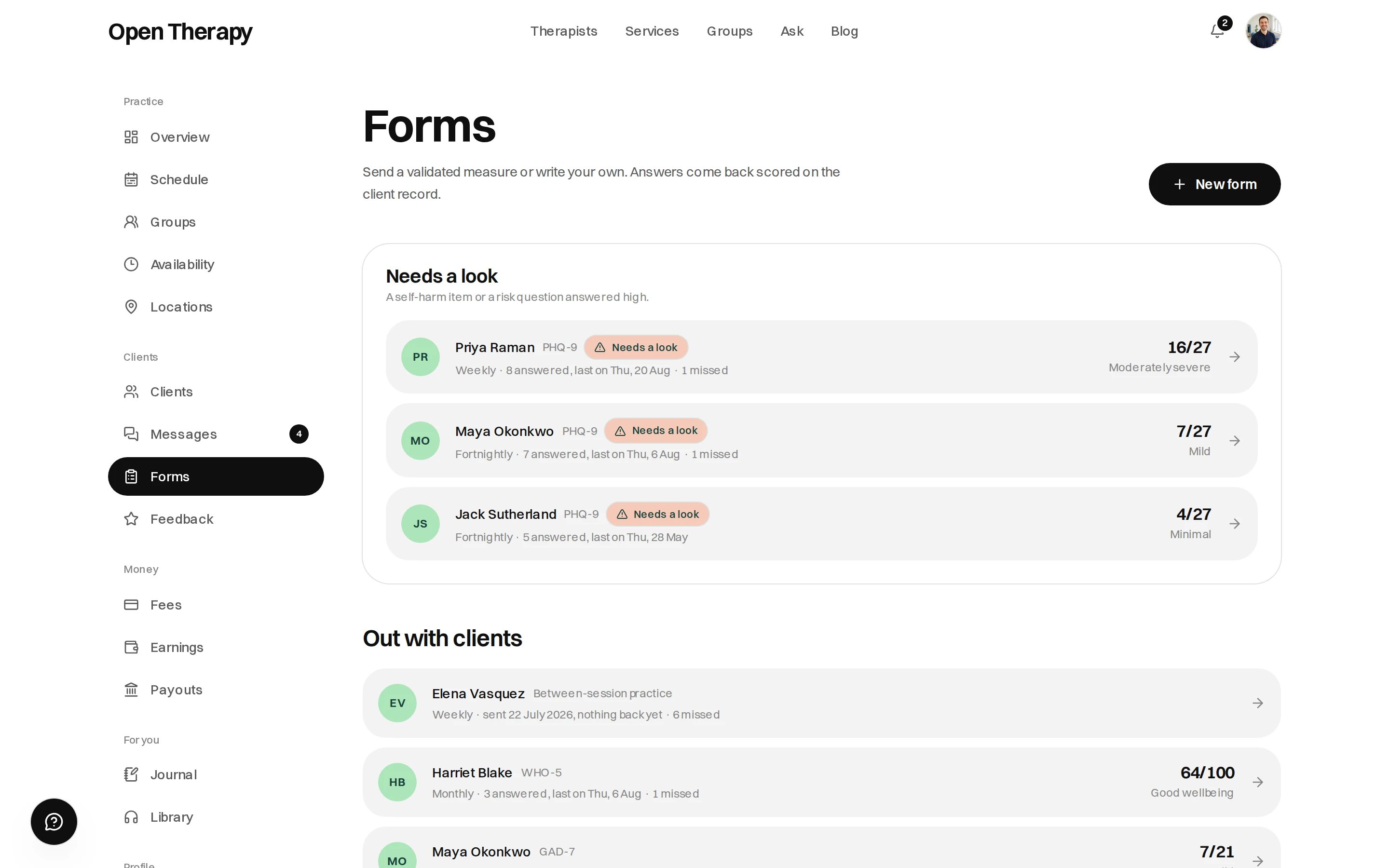
Flagged responses sit above everything else
The client’s sharing switch
Clients control what their therapists see. Outcome measures is described to them as “Your treating therapists see the same K10 and GAD-7 scores you do.” It defaults on. If a client turns it off:
You can ask a client to turn it back on. You can’t turn it on for them, and you won’t be told when it changes.