

When a booking arrives
You get a New booking email — “A new client booked in” for a client’s first session with you, “Another session booked” after that. A first booking carries a line about the introduction fee: “New client — an introduction fee applies to this booking. It appears on your next invoice, once.” See Fees and earnings. The client has already paid. Their money sits with Open Therapy until the session is closed off.Your day
Overview opens on Today: each session with its time, the client, the service and the mode.
Needs you lists sessions in the last fortnight with no note against them, a payout setup left unfinished, no hours published, and messages waiting for a reply. Tick one off and it stays off.
Your schedule
Schedule draws the diary as a grid, in day, week or month view. Four things appear on it:
A checkout hold is drawn separately from a paid session, and the heading counts them apart — “5 sessions booked this week.” and, when one is held, “1 hour is held awaiting payment.” Free meet-and-greets are counted on their own line rather than folded into booked sessions. Week view can be limited to Hours shown, and split by place when you work at more than one.
Click any empty stretch to block it out, New appointment to book one.
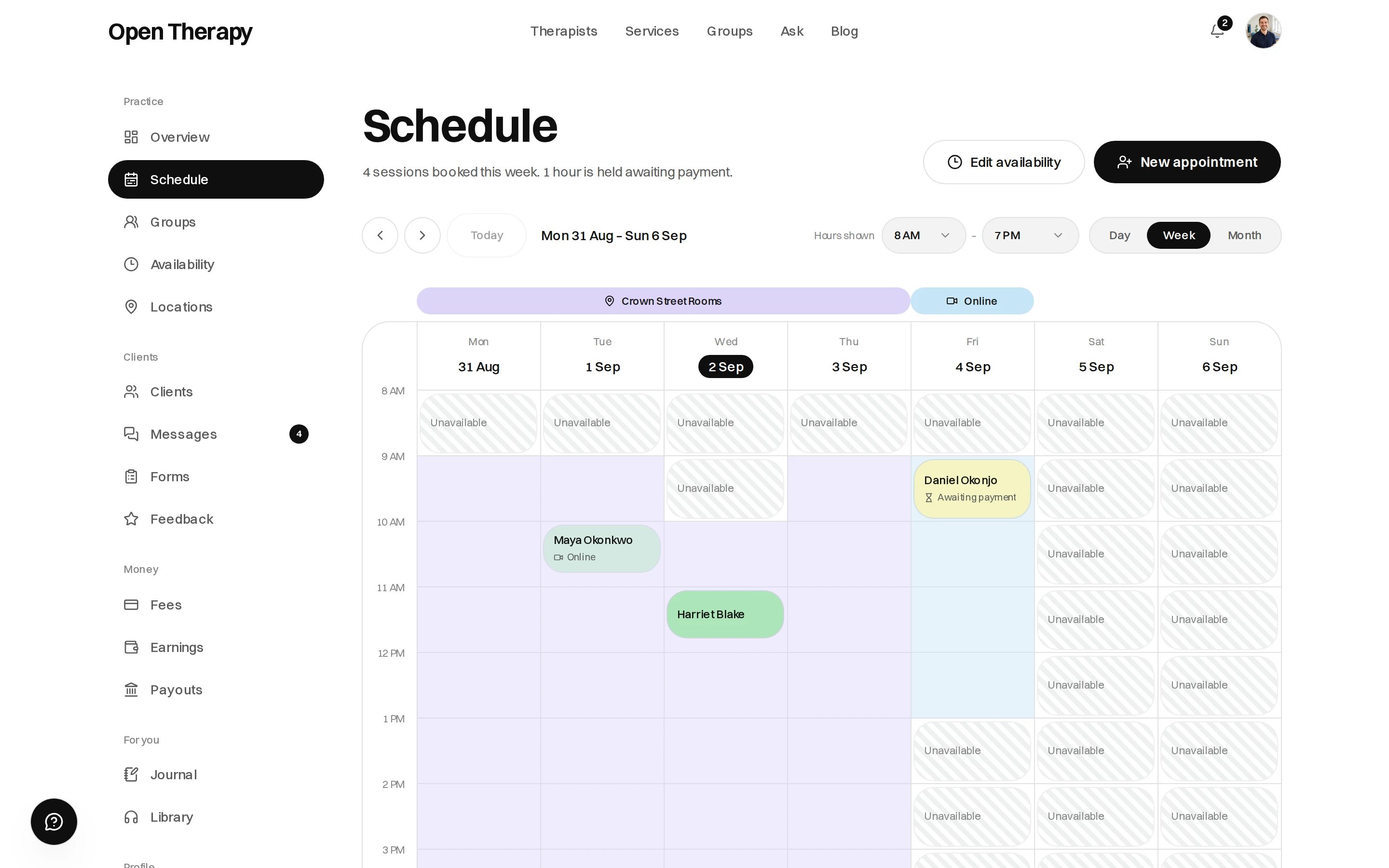
Week view
Booking an appointment yourself
New appointment on Schedule, or Add appointment on Overview. Choose the client — an existing one, or a record you file for someone you see off-platform — then the service, the day and time, and whether it’s online or at one of your locations. The fee defaults to the service’s listed price. Reduce it or set it to zero, but you can’t charge more than the service lists. Add a private note to the appointment if you want one. Only you see it.Repeat bookings
Tick Repeat this appointment for the same hour on the same weekday ahead — weekly or fortnightly, up to twelve occurrences. Any date already busy is skipped and named. With a fee, the client pays for the first session now and for each of the others the week before it.Asking for payment
Email them a payment request sends a link. The hour is held and confirms itself the moment they pay. Someone coming from off-platform sets up their account from the link, then pays. The option needs a finished payout setup and an email address. Without either, book the session and take payment your own way.Recording attendance
Nothing settles and nothing transfers until the session is closed off. A finished session appears in Not closed yet on your earnings screen, with two buttons:Mark complete
The session happened. Fees are itemised, the client’s invoice is issued, and your share is queued
for transfer.
No-show
The client didn’t turn up. Your cancellation policy’s no-show rate is charged and the rest is
refunded.
Why the automatic close exists
The invoice is raised when the session closes, so Mark complete closes a session sooner rather than being the only way to close it.Why a session might refuse to close
Fees still pending
A closed session still waits for Stripe to state what the charge cost before it settles. You’ll see “The session is closed, but its fees are still pending.” Stripe is asked again every hour.Cancelling and rescheduling
A client can cancel or move their own session from Sessions, on the terms of your cancellation policy. Moving is always free; cancelling may not be. There’s no cancel or move button on your side yet. Ask the client to move it, or write to support@opentherapy.app if the hour has to come off the diary. A cancellation recorded as yours never charges the client, whatever the notice. Either way you’re emailed. A cancellation that carried a fee says “Under your cancellation policy, a fee of $90.00 is retained and will settle with your other sessions.” One that didn’t says “No cancellation fee applies. The hour is free again.” When an hour comes free before its start time, anyone waiting is told.What lives elsewhere
Client files
Notes, documents, measures and history.
Messages
Threaded messaging with your clients.
Forms and measures
Intake forms and outcome measures.
Connected calendar
Mirror your own calendar’s busy hours.
Waitlist
People waiting for an hour that comes free.
Groups
Group programs, which settle differently.